The Localize Names window converts workbook-level (global) defined names to worksheet-level (local) names. A localised name is only visible within its specific worksheet and takes precedence over a global name of the same base name on that sheet.
This is useful when you need the same name to refer to different ranges on different sheets — for example, a name called Total that points to different cells on each sheet.
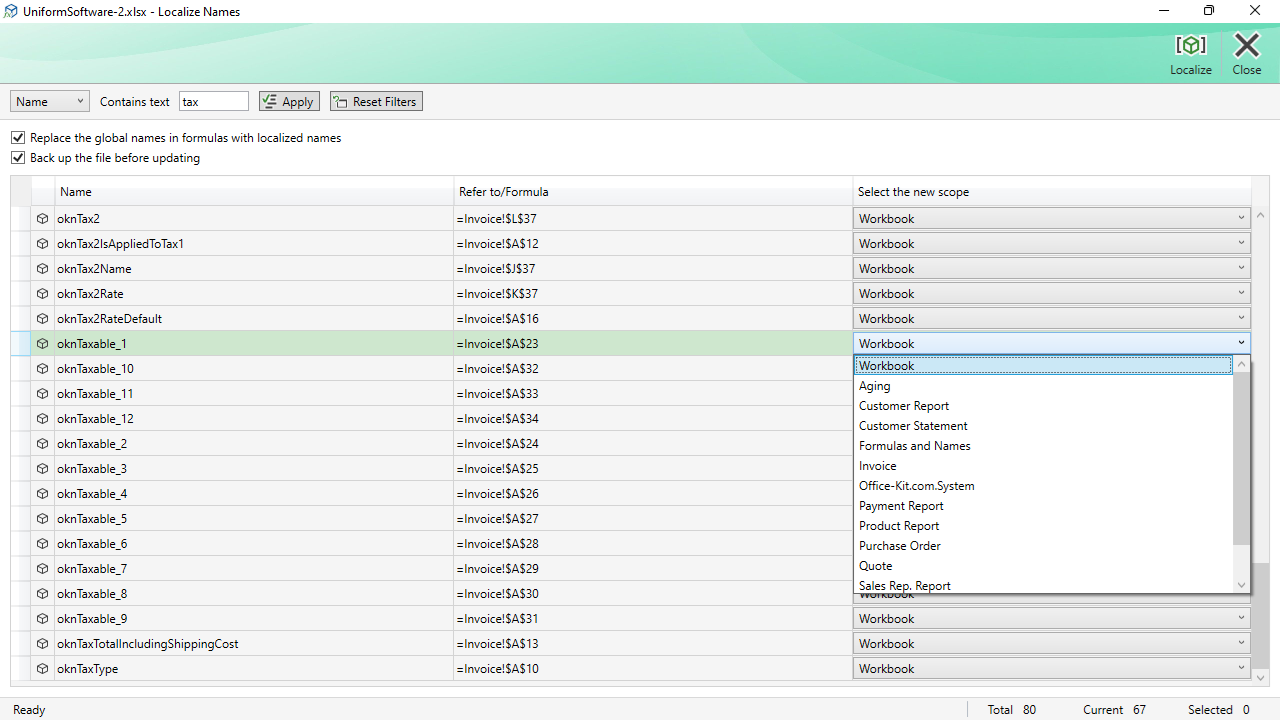
How It Works
The window lists all workbook-level defined names. You mark the ones you want to localise using the checkbox column in the grid. When you click Localize, each selected name is duplicated at the worksheet level for every sheet in the workbook, then the original workbook-level name is deleted.
Optionally, the add-in can also scan all formulas in the workbook and replace references to the old global name with the new local name, so that formulas continue to resolve correctly after the conversion.
Filter Toolbar
| Field selector + Contains text | Searches within Name, Refers to, Value, or Comment columns. |
|---|---|
| Apply | Applies the text filter. |
| Reset Filters | Clears the text filter and shows all names. |
Options
| Replace the global names in formulas with localized names | When checked, every formula in the workbook that references the selected global names is updated to use the new local name. Unchecking this option leaves existing formulas unchanged — they will continue to use the (now-deleted) global name, which may cause #NAME? errors. |
|---|---|
| Back up the file before updating | Creates a backup of the workbook before making any changes. |
Commands
| Localize | Converts the checked names from global to local scope. Shows a progress indicator during the operation. |
|---|---|
| Close | Closes the window. Pressing Escape has the same effect. |
Note: The Localize operation affects every sheet in the workbook. The resulting local names will all point to the same address as the original global name, which you may then need to edit individually per sheet using the Explorer window or Excel's Name Manager.
