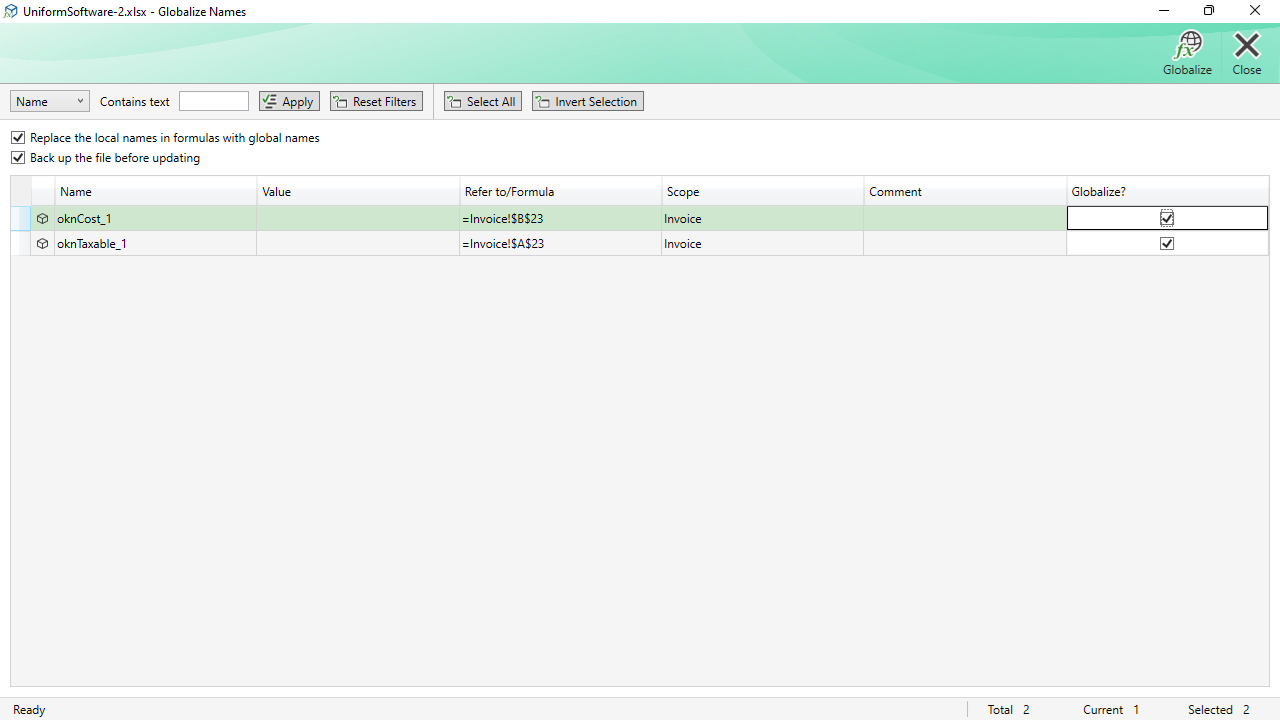
The Globalize Names window is the counterpart to the Localize Names window. It converts worksheet-level (local) defined names into workbook-level (global) names, making them accessible from any sheet in the workbook.
How It Works
The window lists all worksheet-level (local) defined names found in the workbook. You mark the names you want to globalise using the checkbox column. When you click Globalize, each selected name is re-created at the workbook level and the original worksheet-level name is deleted.
If there is already a workbook-level name with the same base name, a conflict must be resolved — the operation will report an error for that name.
Filter Toolbar
The Globalize window has the same filter toolbar as the Localize window, plus two selection helpers:
| Field selector + Contains text | Searches within Name, Refers to, Value, or Comment. |
|---|---|
| Apply / Reset Filters | Applies or clears the text filter. |
| Select All | Ticks the checkbox for every visible row. |
| Invert Selection | Toggles the checkbox for every visible row. |
Options
| Replace the local names in formulas with global names | When checked, formulas that reference the local names are updated to use the new global name. Unchecking leaves formulas unchanged. |
|---|---|
| Back up the file before updating | Creates a backup before making any changes. |
Commands
| Globalize | Converts the checked names from local to workbook scope. |
|---|---|
| Close | Closes the window. Pressing Escape has the same effect. |
