The Export window writes the names and formulas from the active workbook into a dedicated worksheet called Formulas and Names (the import/export sheet). The resulting sheet serves as an editable snapshot of your name definitions that can later be re-imported using the Import window.
Note: Export and Import together provide a workflow for bulk-editing name definitions outside of Excel's built-in Name Manager: Export the names, edit the sheet cells directly, then Import to apply the changes.
How It Works
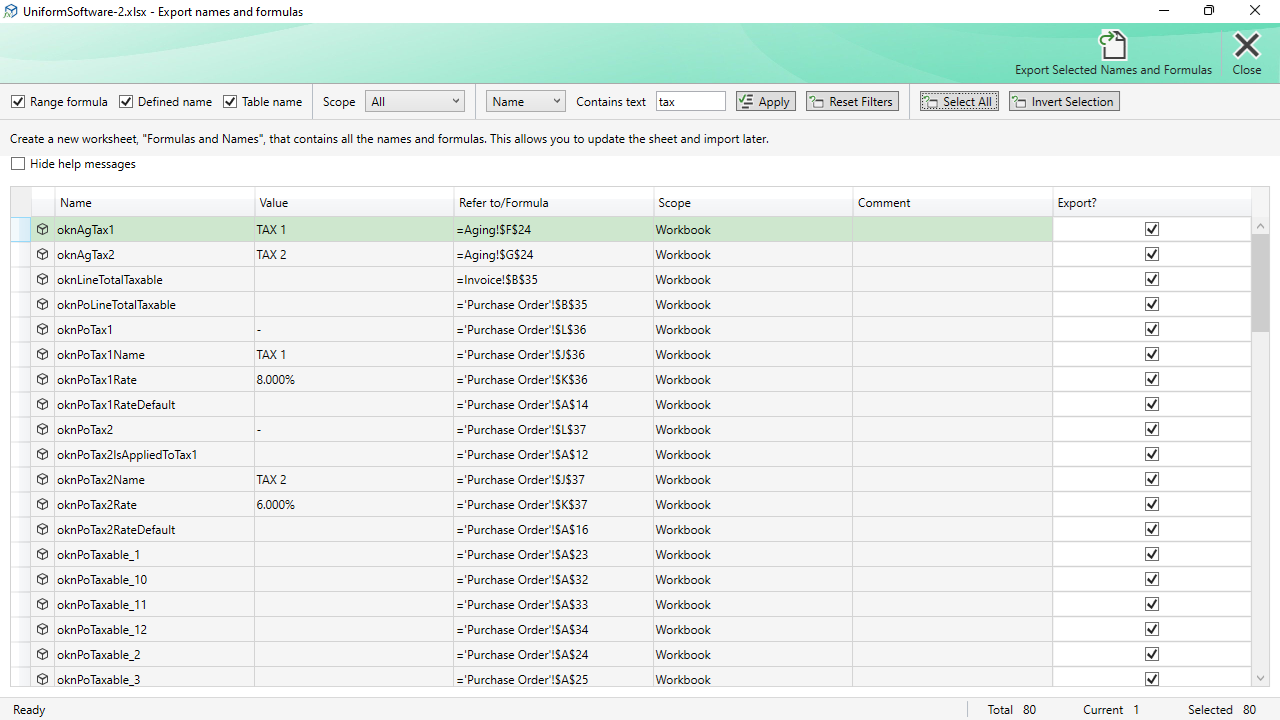
The Export window uses the same list and filter toolbar as the Delete Names window (they share the same underlying form). After filtering and selecting the names you want to export, click Export Selected Names and Formulas.
If a sheet named Formulas and Names already exists in the workbook, you are asked whether to overwrite it. The export creates the sheet, writes a highlighted header row, and then writes one row per exported name.
The Export Sheet Columns
The export sheet contains the following columns. Columns highlighted in the header row are required for import; the others are informational.
| Name | Required. The short name (without sheet prefix for local names). |
|---|---|
| Scope | Required. “Workbook” for workbook-level names, or the sheet name for local names. |
| Refers To | Required. The formula or cell address. Always preceded by a single quotation mark (') in the sheet to prevent Excel from interpreting it as a formula. |
| Visible | Required. TRUE or FALSE. |
| Comment | Required. The comment text (may be blank). |
| Type | Required. The name category: DefinedName, Range, or TableName. |
| Value | Informational. The last computed value of the name at the time of export. |
| Refers To R1C1 | Informational. The Refers To formula in R1C1 reference style. |
Filter Toolbar and Selection
The filter toolbar works identically to the one in the Delete Names window: use the Type checkboxes, Scope drop-down, and text search to narrow the list, then use Select All, Invert Selection, and the Export? checkbox column to choose which names to include.
Commands
| Export Selected Names and Formulas | Exports all rows with the Export? checkbox ticked to the Formulas and Names sheet, then closes the window and activates the export sheet. |
|---|---|
| Close | Closes the window. |
